
Move faster at checkout
Keep transactions simple, reduce extra taps, and make busy periods feel more controlled.
Built for business
Cinteli gives you a modern point of sale foundation for checkout, payments, staff workflows, and daily operations without turning rollout into a training project for the people on the front line.
Keep transactions simple, reduce extra taps, and make busy periods feel more controlled.
Security at the foundation; stations login with Device Codes to never expose account passwords.
Cinteli logs every employee action and gives detailed activity reports. Feel in control because you are.
Operations preview
Use a single management workspace to configure access, payment readiness, device setup, and deeper operating tools while each station stays focused on speed.
One POS foundation
From the things you expect like role-based permissions, to premium features like Kitchen Display Systems.
MODERN P.O.S.
Cinteli gives a simple path for every workflow from order entry to checkout.
Payment lanes
Use our approved hardware for secure Card, Tap, Apple Pay, and Google Pay, or take manual entry payments on any device.
Station rollout
Owner-managed device codes help you bring new stations online cleanly and securely.
Growth tools
Timekeeping, Detailed Reporting, Offline Payments, Custom Device Support, and more!
Checkout built for speed
Cinteli is designed so stations stay focused on the handful of actions that matter most during a live transaction.
Flexible payment rollout
Start with the basics, then move into live payment collection with a setup flow that stays under owner control.
Management that grows with you
The longer scroll is also the product story: Cinteli begins with POS, but it is built to expand into a broader operating system over time.
Hardware
Cinteli supports two card readers in the lineup: a premium black handheld for teams that want offline payments, a touch screen, and extra handheld features, plus a compact white basic reader for a cleaner everyday counter setup.
Premium Reader
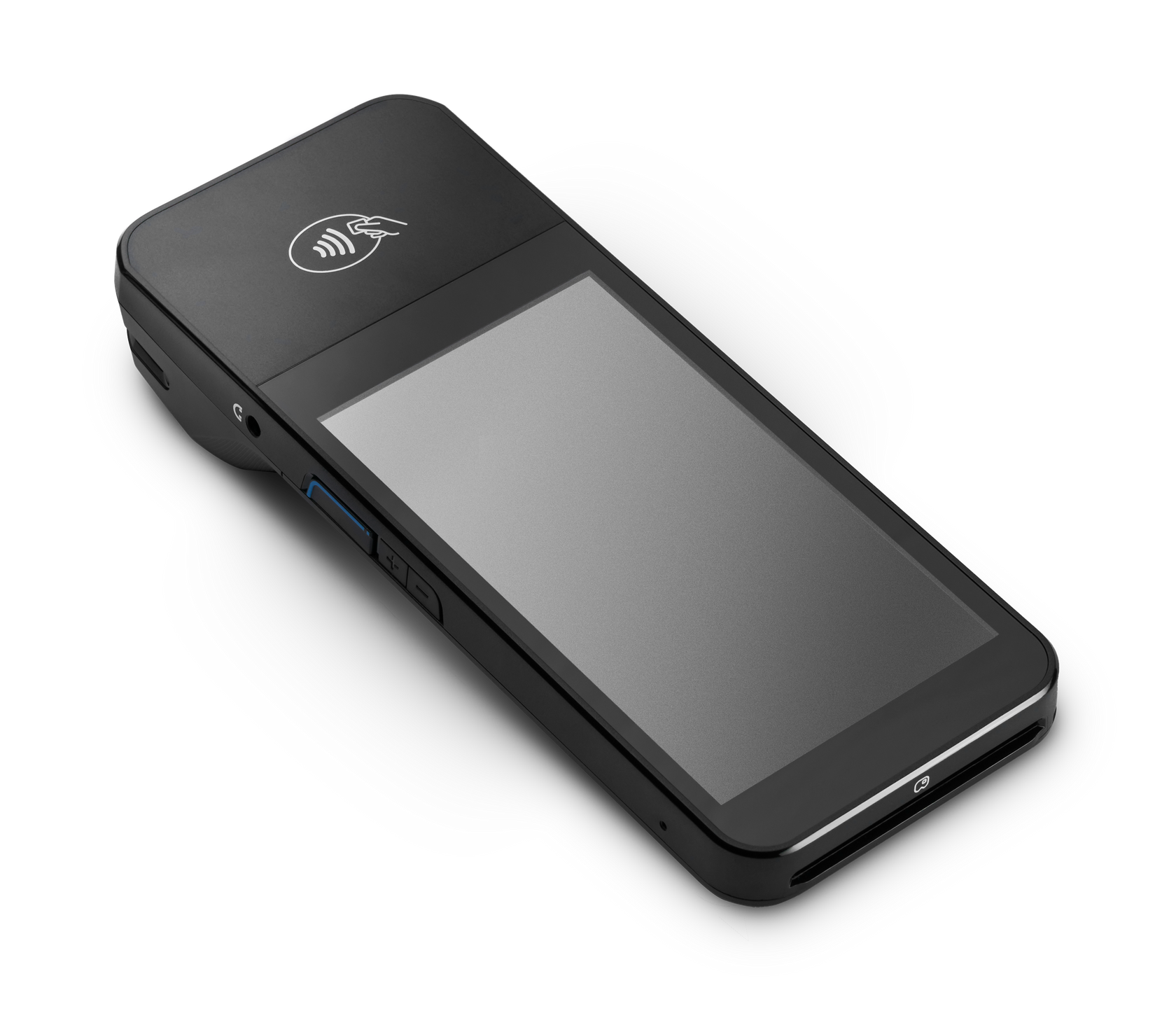
Built for teams that want more flexibility on the floor while keeping checkout fast and polished.
Basic Reader
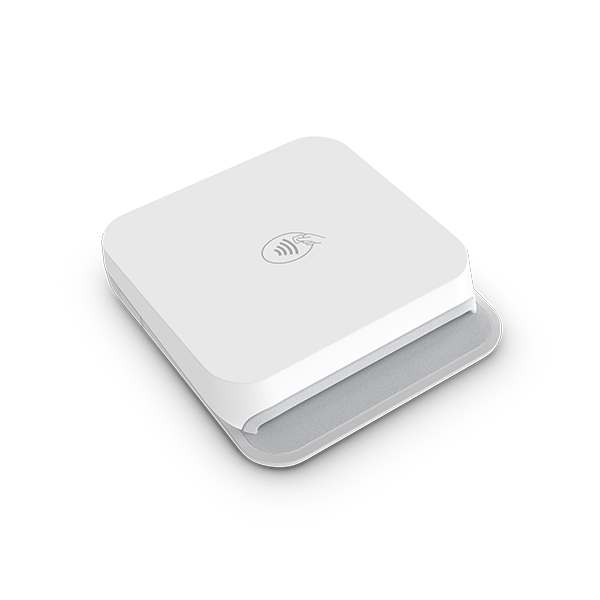
A smaller everyday reader for businesses that want a simple countertop payment setup.
Why it sells better now
Inspired by longer POS and operations landing pages like MyTime, this version keeps explaining value as you scroll: core POS, payment readiness, secure stations, owner controls, and the next layer of operational tools.
Launch
Create the company, configure payments, and bring your first stations online quickly.
Optimize
Unlock timekeeping, higher-detail reporting, and broader operational visibility as you grow.
Expand
Scale from a single counter setup toward broader workflows, more stations, and multi-location support.
Ready to launch
Home is now the fuller management and marketing experience, while the former homepage lives at /station.
Overview
Created today
Full settings access is available on this session.
Payments remain blocked until onboarding is finished in Settings.
Hardware can be paired after the account and payout profile are ready.
Launch checklist
Included with Cinteli
Manual Payments
Manual payment
This is a manual payment tool for charging a custom amount outside the full POS flow.
No amount entered yet. Add a custom amount to prepare a manual payment.
Enter at least $0.50, then choose a checkout lane.
Current readiness
Waiting for setupThe app is usable, but live payment actions should stay disabled until the connected account is ready.
Current checkout
Build an order from the Register page before loading a payment form or collecting a reader payment.
Web card entry
Use the secure card form to collect payment right in the browser.
Load the secure card form when this account is ready to take payments.
Card reader
Use the demo reader while training, then switch to your live reader when you are ready to accept in-person card payments.
Discover a reader first. Your live reader must already be linked to this business.
Settings
Settings locked
This session was started with a device code. Device-code sessions can use the POS, but owner-only settings stay locked until the owner signs in with email and password.
Company profile
Taxes and fees
Add up to three taxes and three fees with custom names and percentages. This is a good place to keep the state tax in one slot and reserve the others for local taxes, service fees, or other charges. Leave "Apply to Cash Payments" checked for items that should apply everywhere, or uncheck it to keep that line item card-only.
These presets are saved to your business account for future checkout use.
Access policy
Cinteli plan
Start on Cinteli Basic for free, then move to Plus or Pro for lower Terminal and Web Manual Entry pricing plus deeper back-office tools.
Choose Cinteli Plus or Pro to unlock more features, flexible owner presets, and lower Terminal and Web Manual Entry pricing.
Restaurants
Create the active menu, modifier groups, floors, and tables that load directly into the POS workspace.
Editors
Open either editor as its own full-screen builder, then return here when you are done.
Build your menu and layout here, then open /pos to seat tables and start tickets.
Team access
Create a staff login with a role, hourly rate, employee ID, and four-digit passcode. Passcodes stay hidden by default until you tap to reveal them.
Add an employee to generate an ID and passcode for the staff list below.
Current team
No employees added yet.
Payment onboarding
Complete payment setup here when your business is ready to accept live payments.
Complete payment setup to start accepting live card payments.
What to expect
Recent sales
Review recent sales and payment status here.
No orders have been created yet.
Generate device code
Generate owner-managed device codes so stations can sign in without sharing the account password.
Codes are shown in full only once. The list below only shows masked values after creation.
New code
Save this code securely. It will not be shown in full again after you leave this screen.
Device code list
No device codes created yet.
Restaurants
Build categories, items, pricing, and modifier groups in a dedicated full-screen workspace.
Restaurants
Arrange tables, seating shapes, and dining room layout in a full-screen planning canvas.